



As an Amazon Associate we earn from qualifying purchases.
The Google Nest Wifi Pro is a Wi-Fi 6E tri-band mesh router promising up to 5.4 Gbps in combined speeds and 2,200 square feet of coverage per node — and the short version of this review is that it is a genuinely good mesh system overshadowed by one big question mark. Setup through the Google Home app is famously plug-and-play, independent reviews praise its strong and stable performance and range, and it doubles as a smart-home hub with Matter and Thread border router support. The downsides: no speaker (unlike older Nest Wifi points), zero compatibility with older Nest Wifi or Google Wifi units, a premium price next to rival mesh systems, limited advanced settings, and real-world speeds that fall short of the marketing in some tests. And the elephant in the room: Google has delisted the Nest Wifi Pro from the Google Store, raising the possibility of discontinuation and uncertain future support.
This is a research-based review. I analyzed the published specifications, the brand’s marketing claims, and patterns across independent reviewer tests and buyer feedback rather than testing the hardware hands-on.
| Detail | Spec |
|---|---|
| Product photo | 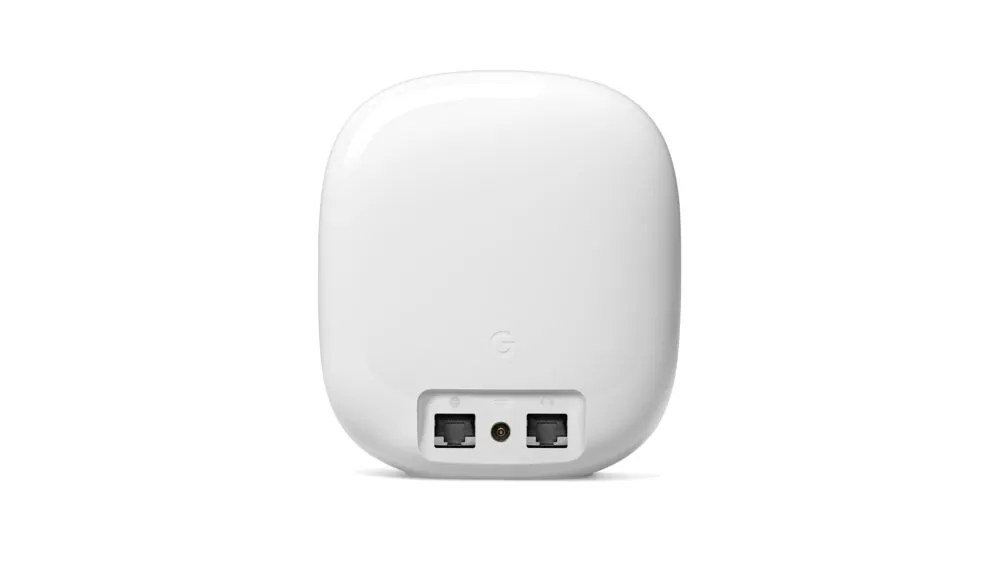 |
| Name | Google Nest WiFi Pro — Wi-Fi 6E Mesh Router, Snow |
| Key specs |
|
| Best for | Google Home households that want simple, stable Wi-Fi 6E mesh coverage plus a built-in smart-home hub — and who are comfortable with the discontinuation risk. |
| Check Price on Amazon | |
Product overview
The Nest Wifi Pro is Google’s Wi-Fi 6E mesh router: a tri-band system that adds the 6 GHz band alongside 2.4 GHz and 5 GHz, rated AXE5400 for up to 5.4 Gbps in combined theoretical throughput. Each router covers up to 2,200 square feet and the system expands as a mesh with additional nodes, so larger homes can add units rather than replacing the setup. Every node carries two Gigabit Ethernet ports, which allows wired backhaul between nodes or a wired connection for a desktop, console, or TV. The unit reviewed here is the Snow colorway; Google also sold Linen, Fog, and Lemongrass, plus a 3-pack in Snow and multi-color bundles.
Under the hood, each node runs a 1 GHz dual-core CPU with 1 GB of RAM and 4 GB of flash storage — modest on paper, but mesh routers live or die on software, and Google’s software story is strong: WPA3 security, automatic firmware updates, and management entirely through the Google Home app. The Pro also doubles as a smart-home hub with Matter support and a Thread border router built in, so it can anchor a modern smart-home setup without a separate hub. The design is classic Google: a smooth, glossy rounded form that blends into a shelf rather than screaming “networking hardware.”
In the lineup, the Nest Wifi Pro sits between basic ISP routers and enthusiast-grade mesh systems. Its pitch was Wi-Fi 6E at a mainstream price with Google’s trademark simplicity. That pitch still describes the hardware accurately — but the context has shifted: with the product delisted from the Google Store, buyers are now weighing a good router against the risk of a platform Google may be walking away from.
Brand claims vs. reality
Google marketed the Nest Wifi Pro as up to 2x faster than Wi-Fi 6 routers using 80 MHz channels. Treat that as a marketing claim, not a promise: actual speeds depend on your ISP plan, your client devices, and your home’s layout and interference. The 6 GHz band is genuinely fast, but it is also short-range and indoor-only, so its contribution shrinks in larger homes or through thick walls. Independent tests have found real-world speeds falling short of the marketing hype — still fast in absolute terms, just not the headline numbers.
Coverage claims deserve the same skepticism. “Up to 2,200 square feet per router” is a lab-condition figure; real homes with walls, floors, and interference get less, which is exactly why mesh expandability exists. Plan your node count on the conservative side if your home is large or has dense construction.
What buyers like
- Easy plug-and-play setup. Setup through the Google Home app is consistently described as painless — the main reason non-technical buyers choose Google’s mesh over enthusiast alternatives.
- Strong, stable performance and range. Independent reviews praise reliable throughput and solid coverage, with the mesh handoff working quietly in the background.
- Sleek design. The compact, glossy nodes look like home decor rather than networking gear, which matters when routers sit in living rooms.
- Smart-home hub built in. Matter support and a Thread border router mean the Pro can anchor a smart home without extra hardware — a real differentiator at its price.
What buyers complain about
- No speaker. Older Nest Wifi points doubled as Google Assistant speakers; the Pro drops that entirely, which disappointed buyers who used the combo.
- Not compatible with older units. The Pro does not mesh with older Nest Wifi or Google Wifi hardware — existing owners must replace the whole system, not just add a node.
- Pricey versus rivals. Competing Wi-Fi 6E mesh systems sometimes deliver more hardware or features per dollar, especially on sale.
- Limited advanced customization. Power users miss the granular controls of enthusiast routers; the Google Home app keeps things simple by hiding the knobs.
- Speeds below the hype. Some independent tests measured real-world throughput well under the marketing figures — fast, but not as fast as promised.
Red flags to know before buying
- Google delisted the Nest Wifi Pro from the Google Store — possible discontinuation. This is the biggest red flag: a delisted first-party product raises real questions about future firmware updates and long-term support.
- Future firmware and support are uncertain. Mesh routers depend on ongoing updates for security and performance. Buying into a possibly discontinued platform means accepting that risk.
- 6 GHz requires Wi-Fi 6E-capable clients, indoor use only. Older phones, laptops, and IoT gadgets cannot use the 6 GHz band at all, and regulations limit it to indoor operation.
- Not backward compatible — existing owners must replace the whole system. If you run older Google or Nest Wifi gear, none of it carries over; budget for a complete replacement.
Does Nest Wifi Pro work with old Google Wifi?
How much area does one Nest Wifi Pro router cover?
Does the Nest Wifi Pro have a speaker?
Is the Nest Wifi Pro worth buying in 2026?
Verdict
The Nest Wifi Pro is a genuinely good mesh router trapped in an uncertain product story. The hardware and software fundamentals are strong: easy Google Home setup, stable and fast real-world performance, good range, Matter and Thread hub features, and a design you will not mind looking at. The case against it is compatibility — nothing from older Google/Nest generations carries over — plus the missing speaker, limited tinkering options, and speeds that trail the marketing. Above all sits the delisting: Google pulling the Pro from its own store is the kind of signal that should make any buyer pause. Worth buying in 2026 if you find it at a sharp clearance price, run a Google Home household, and accept the support risk. Not worth it at full price, for existing Nest Wifi owners who would have to start over, or for anyone who needs their router to be a safe ten-year bet.
